Solitaire - Classic Card Games
- 4.9
- Rating
- 50.00M
- Installs
- Free
- Price
 Analysis by App-foxy
I approached Solitaire - Classic Card Games as the sort of game I could open for a few quiet minutes rather than something I needed to study before playing. That first impression still holds: it is a familiar card game from Guru Puzzle Game, presented for Android users who want a quick solo distraction. The app is free to install, suitable for Everyone, and its straightforward card-table format makes the first round feel approachable even if you have not played solitaire recently.
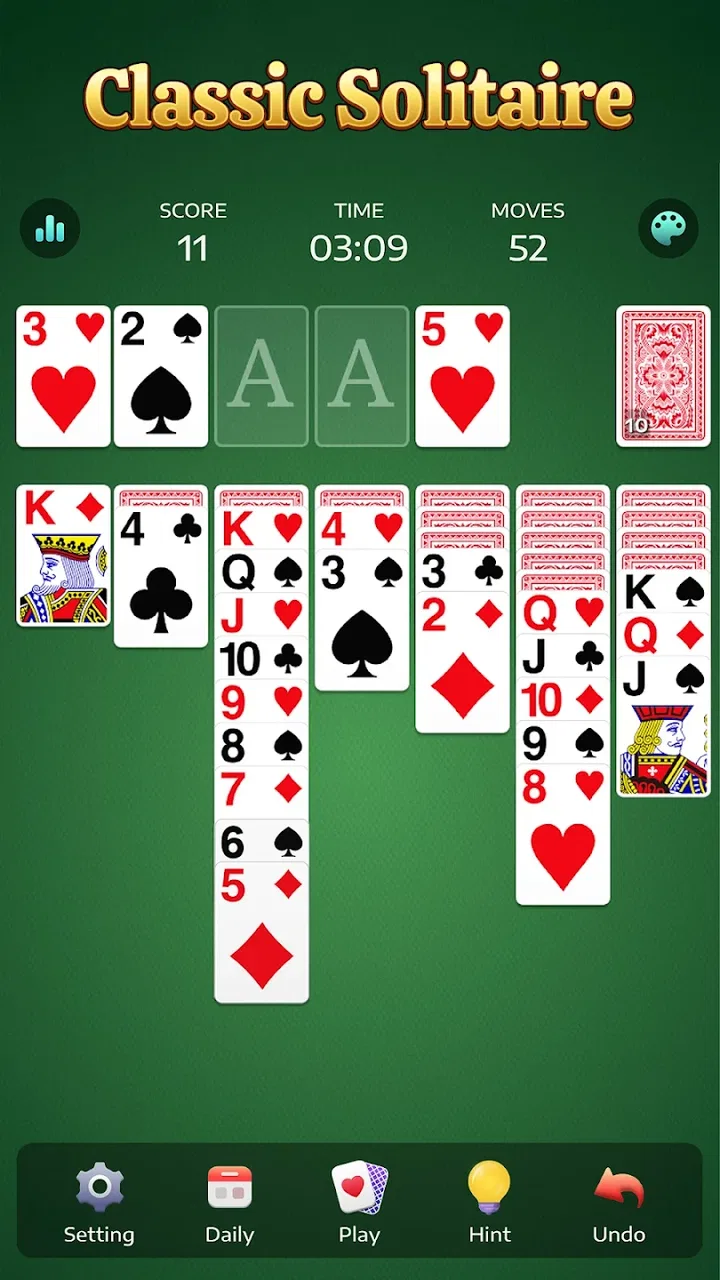
What matters here is not a complicated progression system or a large learning curve. The appeal is the small decision-making loop: reveal a hidden card, create a useful sequence, move cards into a better position, and gradually clear the table. I found that rhythm especially comfortable during short breaks, while waiting for an appointment, or at the end of the day when I wanted something interactive but not demanding.
What to expect when you open the game
The game belongs firmly to the classic card game category. You are not entering a competitive multiplayer environment or a story-driven adventure. The focus is on solitary rounds where each move changes the available possibilities. That makes it easy to pick up, but it also means the experience depends heavily on whether you genuinely enjoy traditional solitaire rather than needing constant novelty.
You May Also Like

 Blood Strike: 2.5 Anniversary
Blood Strike’s Loadouts Turn Every Drop Into a Tactical Gamble
A close look at Blood Strike’s custom loadouts: how fast access to signature weapons reshapes its battle royale rhythm, rewards preparation, and narrows the gap between fights.

 Pandora - Music & Podcasts
Pandora’s Music Is Easy to Start, but Harder to Recover
Pandora’s strength is its low-effort path from a seed to a station. Its weak spot is how much confidence it asks you to place in connection, setup, and quiet recovery.

 8 Ball Pool
8 Ball Pool Is Built on Rivalries, Rematches, and Routine
A close look at the rivalries, rematches, shared routines, and unanswered safety questions that turn a quick pool match into a persistent mobile community.

 Samsung Music
Samsung Music’s Quiet Strength Is Playing What You Already Own
Its reach comes less from spectacle than from dependable access to a personal library. That simplicity is both the app’s strongest retention engine and its ceiling.

 AccuWeather: Weather Radar
AccuWeather Review: A Quick, Clear Forecast for Everyday Decisions
For everyday plans, the best forecast is the one you can understand quickly. AccuWeather makes rain timing, radar, and local conditions easy to act on, with a few trade-offs.

 Hill Climb Racing
Why Hill Climb Racing Still Turns Crashes Into One More Run
A tiny car, a bumpy hill and one more upgrade: Hill Climb Racing keeps resurfacing because its simple chaos makes every near-miss feel personal.
More From Our News Desk



The store summary describes it as a relaxing classic solitaire experience, and that is a fair description of the intended mood. In practice, relaxation depends on how you play. A quick, obvious move can make a round feel smooth, while an early mistake may leave you reviewing the layout and wondering whether a different choice would have opened more cards. I like that tension in moderation because it gives the game a little thought without turning every round into a puzzle marathon.
The scale of its audience is a useful signal for newcomers. The app has passed 50 million installs and holds an average rating of 4.8 from a very large group of players. Those figures do not guarantee that every person will enjoy it, but they suggest that the basic presentation and familiar rules work for many people. I would still judge it by your habits: if you want calm, repeatable card sessions, it is a natural candidate; if you want deep strategy or social competition, it may feel limited.
There is no purchase required to begin. The game is listed as free, although optional in-app purchases range from $0.99 to $59.99 per item. I would treat that as a reason to pay attention during installation and play, especially if the device is shared with a child. The Everyone content rating makes the game broadly accessible, but the presence of optional purchases is still relevant when deciding how you want the app used.
Why the familiar format still works
Solitaire has a useful balance between rules you can remember and decisions that are not completely automatic. You generally know what a legal move looks like, yet the order in which you expose cards can determine whether the round stays open. That gives me a reason to think ahead without forcing me to memorize a complicated rulebook.
One detail I appreciate is that the game can fit different attention levels. I can play deliberately, considering which hidden card to reveal first, or make quick moves when I only have a short window. The same round can therefore serve as a brief mental reset or a longer attempt to finish a challenging layout. It is not an especially rich substitute for a strategy game, but it is more engaging than simply watching a timer pass.
The trade-off is repetition. The core activity remains card arrangement, so players who need fresh objectives, changing worlds, or a strong narrative may lose interest. I would not install this expecting a broad collection of unrelated game types. Its strength is focus, and that focus is also its main limitation.
Getting started without overthinking the first round
Installation is aimed at older Android devices as well as newer ones because the minimum operating system is Android 6.0. After opening the game, my advice is to start playing immediately rather than searching for every option first. A first-time user learns more by examining the card layout and trying a legal move than by attempting to understand every possible setting in advance.
Before beginning, I would make two simple decisions. First, choose a comfortable pace: use a short session if you are testing the game, and give yourself more time if you want to understand how the layout develops. Second, decide whether you are playing for completion or for relaxation. Those goals lead to different behavior. Completion encourages careful planning, while relaxation makes it perfectly reasonable to restart when the layout stops being enjoyable.
The current version is 5.11.1-25120246, and the game comes from Guru Puzzle Game. I mention the version because it is useful when checking that your installation is current or when comparing what you see with another Android device. More importantly, the app’s low entry barrier means you do not need prior experience with this particular release to begin making progress.
Your first meaningful success
For a new player, the first useful milestone is not finishing a complete round. It is recognizing that a move can serve two purposes at once: it may improve the visible arrangement while also uncovering a card that was hidden underneath. Once I started looking for that second benefit, the game became less about moving any available card and more about opening the table intelligently.
When I play, I first scan for moves that reveal a concealed card or free an empty space. I avoid immediately committing every obvious move if another option could expose more information. This is a small habit, but it changes the experience. You begin to see the layout as a set of future possibilities rather than a row of isolated cards.
A practical first-session routine is to make one or two clear moves, pause, and inspect the new arrangement before continuing. That pause prevents a common beginner mistake: moving cards quickly simply because the move is legal. In solitaire, legal does not always mean helpful. Sometimes the better action is the one that preserves flexibility for the next turn.
If the first round goes badly, I would not read too much into it. The game is designed around repeated layouts and decisions, and a failed attempt is useful when it shows which move closed off the table. Restarting can be part of learning rather than a sign that the app is too difficult. The important thing is to notice what changed after your first choice.
Common points of confusion
The biggest source of confusion for a returning player is usually not the rules themselves but the order of operations. A move that looks productive may place a card where it cannot help reveal anything else. I recommend checking the hidden-card columns before moving cards into a neat-looking sequence. A tidy arrangement is not always the most valuable arrangement.
Another issue is impatience with automatic-looking progress. The game can feel simple when several moves are available, but the meaningful decisions often appear after the obvious cards have been shifted. If you rush through the opening, you may miss the move that creates the most room. I found that treating each exposed card as new information made the middle of a round easier to read.
New users may also wonder whether they should continue a round that appears stuck. My answer is situational. If you can identify a move that reveals a card or opens a needed space, continue and explore it. If you are only repeating moves without changing the available layout, restarting is usually a better use of a short break. The game is most enjoyable when you are making decisions, not when you are mechanically retracing them.
There is also a psychological trap: assuming that a nearly complete-looking table must be close to success. A round can look organized while still lacking the one card needed to continue. I try not to judge progress by appearance alone. I look at whether the next move increases access to hidden cards or reduces the number of blocked positions.
A realistic everyday session
Imagine opening the game while waiting for a bus that is running late. You have enough time for a few moves but not enough certainty to commit to a long session. I would start a round, make the clearest opening moves, and use the first minute to decide whether the layout feels worth pursuing. If the choices become interesting, I continue; if the table quickly becomes repetitive, I leave it and return later.
That flexibility is where the app fits best. It does not demand a headset, a large uninterrupted block of time, or a social group. It gives you a quiet activity that can be stopped between moves. I would still avoid using it when I need to concentrate on a conversation or navigate somewhere, because even a simple card game can draw more attention than expected once a round starts going well.
For an older family member who already knows solitaire, the familiar format may be more valuable than a more elaborate mobile game. For a child, the Everyone rating makes the content broadly approachable, but I would still keep the purchase settings in mind. For someone trying to reduce screen stimulation, the game may be calmer than an action title, though it remains a screen-based pastime rather than a replacement for a real break.
How to use the game more thoughtfully
My first practical tip is to value information over immediate neatness. When two moves are legal, prefer the one that exposes a hidden card or creates a genuinely useful empty space. This is not a guarantee of victory, but it gives you more options to evaluate. It also makes losses easier to understand because you can trace the point where the table became less flexible.
My second tip is to separate “safe” moves from “committed” moves. A safe move changes the arrangement without closing many future choices. A committed move may look attractive but uses a card in a way that prevents other sequences. I try safe moves first, then reassess the whole layout before making a commitment. This approach is particularly helpful during the middle of a round, when several columns may compete for the same card.
My third tip is to use short sessions as deliberate practice rather than always chasing a finished game. For example, spend one session focusing only on uncovering hidden cards efficiently. In the next, pay attention to preserving empty spaces. This gives the familiar format a little more depth and helps a beginner develop a repeatable way to read the table.
A further trade-off is the balance between restarting and persevering. Restart too quickly and you may never learn from a difficult position. Continue too long and the game can stop feeling relaxing. I usually give a stuck layout a careful scan for one meaningful alternative, then restart if no move changes the situation. That boundary keeps the app useful during short breaks instead of turning it into a frustrating obligation.
How it compares with other ways to play solitaire
Compared with playing a physical deck, the app is more convenient because the cards are always arranged for you and a session can begin instantly. The physical version wins if you enjoy handling cards, controlling the layout yourself, or taking a break from a screen. I see the mobile version as a practical companion rather than a replacement for that tactile experience.
Compared with a broader casual-game collection, this title is narrower but easier to understand. You do not need to learn several unrelated systems before getting value from it. The downside is that players who depend on constant variety may find a dedicated solitaire game repetitive sooner than a collection with puzzles, word games, and arcade modes.
Compared with competitive card games, it offers a quieter experience because your attention stays on your own decisions. That is ideal when I want to unwind, but it removes the pressure and excitement that come from playing another person. I would choose this app for a solo routine, not for social interaction or ranking-based motivation.
The free entry point is another advantage over buying a physical deck specifically for travel, although optional purchases mean “free” should not be interpreted as “without any commercial prompts or spending choices.” If you want a completely purchase-free environment, a physical deck may feel simpler. If convenience matters more, the mobile format is easier to keep at hand.
Who should install it, and who should skip it
I recommend it to first-time mobile solitaire players, people returning to the card game after a long break, and anyone who wants a low-pressure activity that can be played in small pieces. It is also a reasonable choice for Android users with older compatible devices because the minimum operating system reaches back to Android 6.0.
I would be more cautious if your main goal is a deep strategic challenge with many distinct modes. The familiar format can reward careful play, but it does not transform into a large strategy system. I would also skip it if you specifically want multiplayer competition, a story, or a constantly changing collection of genres.
Players who are sensitive to optional purchases should decide in advance whether they are comfortable with the listed item range of $0.99 to $59.99. Setting a personal rule before playing is easier than making an impulse decision after becoming invested in a round. That is especially important on a shared device.
My final take after settling into the routine
After spending time with it, I see Solitaire - Classic Card Games as a focused, accessible card game rather than an ambitious all-purpose mobile experience. Its best quality is the way it turns a familiar deck arrangement into a flexible five-minute activity. The rules are approachable, but careful choices still matter once the opening moves are finished.
The app has been available since April 25, 2021, and its broad adoption reflects how dependable the solitaire format remains on a phone. I would not choose it for novelty, social play, or a large amount of content variety. I would choose it when I want a quiet round, a small mental challenge, and the freedom to stop without losing the point of the session.
My recommendation is simple: install it, begin with one round, and judge it by how the first few decisions feel rather than by whether you win immediately. Look for moves that reveal information, pause before committing a useful card, and restart when the layout has genuinely stopped offering choices. If that rhythm suits you, this free game is an easy companion for everyday waiting and winding down.
FAQs for Solitaire - Classic Card Games
01What are the key features of Solitaire - Classic Card Games?
Solitaire - Classic Card Games offers a traditional solitaire experience with a user-friendly interface. It includes various modes like Klondike, Spider, and FreeCell. The app features customizable card backgrounds, daily challenges, and leaderboards to compete with friends. It also provides hints and undo options to enhance gameplay.
02Is Solitaire - Classic Card Games free to download and play?
Yes, Solitaire - Classic Card Games is free to download and play. However, it contains in-app purchases for premium features, such as additional card designs and ad-free experiences. While the core gameplay is accessible without spending money, these optional purchases can enrich your experience.
03Can I play Solitaire - Classic Card Games offline?
Absolutely! Solitaire - Classic Card Games can be played offline, making it perfect for those times when you’re traveling or without internet access. You can enjoy all the classic modes without needing a connection, although some features like daily challenges may require online access.
04What are the system requirements for Solitaire - Classic Card Games?
For Android users, the app requires Android 4.4 or later, while iOS users need iOS 9.0 or later. The app is optimized for both smartphones and tablets. Ensure you have sufficient storage space, as the app may vary in size depending on updates and additional content.
05Is Solitaire - Classic Card Games safe for children?
Yes, Solitaire - Classic Card Games is safe for children. It has a simple interface and clean graphics without inappropriate content. However, parents should be aware of in-app purchases and advertisements. Supervision is recommended if you wish to prevent accidental purchases.
Pros
- Simple and intuitive interface.
- Smooth and responsive gameplay.
- Customizable card decks and backgrounds.
- Offline mode available for play anywhere.
- No intrusive ads during gameplay.
Cons
- Limited game variations available.
- Occasional minor bugs in updates.
- No multiplayer mode included.
- Lacks daily challenges or rewards.
- In-app purchases for extra features.

Solitaire - Classic Card Games
Gallery